
- Published:
- referral code attribution
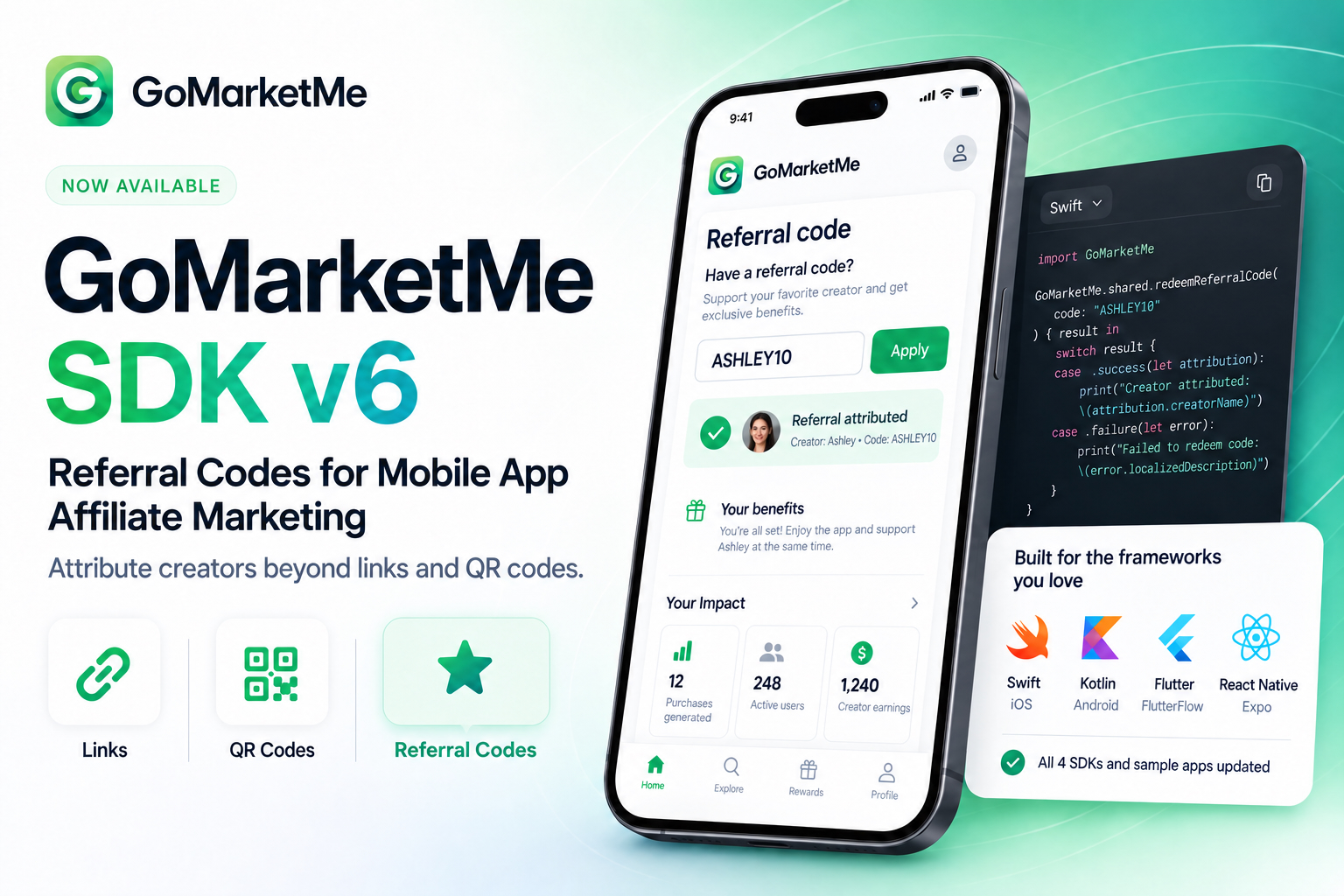
GoMarketMe SDK v6 is now available across Swift, Kotlin, React Native/Expo, and Flutter, adding referral code attribution for mobile apps on iOS and Android.
App developers can now let users enter a creator’s referral code, such as ASHLEY10, directly inside their app. That gives affiliates, creators, influencers, ambassadors, and partners a trackable way to promote an app when a clickable link or QR code isn’t the best fit.
All four GoMarketMe SDKs have been updated for v6, along with their sample apps.
Referral links aren’t going away. Neither are QR codes.
SDK v6 adds a third option:
Links when users can click. QR codes when users can scan. Referral codes when users can listen, remember, and type.
For mobile app marketers, that means more ways to attribute creator-driven users and revenue without forcing every promotion into a clickable-link journey.
What is new in the GoMarketMe SDK v6?
The headline feature in SDK v6 is referral code attribution.
Marketers can assign referral codes to affiliates and creators, while app developers provide a simple place inside the app where users can enter those codes.
For example:
Have a referral code?
ASHLEY10
When an eligible user submits that code, GoMarketMe can associate the user with the referring affiliate and continue measuring the purchases, subscriptions, revenue, and commissions generated by that relationship.
SDK v6 brings this capability across the full GoMarketMe SDK ecosystem:
- Swift for native iOS apps
- Kotlin for native Android apps
- React Native for React Native and Expo apps
- Flutter for Flutter and FlutterFlow apps
The corresponding sample apps have also been updated so developers can see how referral-code flows fit into a real integration.
Why referral codes matter for mobile app affiliate marketing
Affiliate links work extremely well when users can click.
But app discovery doesn’t always happen on a clickable screen.
Someone might hear about your app during a podcast. They might watch a creator on a television. They might hear an app recommendation during a livestream. A creator might mention your app verbally in a TikTok or YouTube video. An ambassador could recommend the app during an in-person conversation.
A referral code might also appear on a poster, flyer, event display, package, or other physical material.
In those situations, asking the user to locate and click a specific affiliate URL creates unnecessary friction.
A short referral code creates a much simpler call to action:
“Download the app and enter ASHLEY10.”
That’s the problem SDK v6 solves.
Links, QR codes, and referral codes now work together
Referral codes don’t replace GoMarketMe’s existing referral methods.
They complement them.
GoMarketMe already gives affiliates promotional assets such as unique referral links and QR codes. Referral codes expand that toolkit further, giving affiliates more ways to promote mobile apps across different channels.
The right referral method depends on the context:
| Referral method | Best for |
|---|---|
| Referral links | Websites, social profiles, newsletters, messages, and other clickable content |
| QR codes | Desktop screens, videos, presentations, events, and physical media |
| Referral codes | Podcasts, livestreams, conversations, TV, video, print, events, and word of mouth |
A YouTube creator might use both a clickable link in the description and ASHLEY10 on screen.
A podcast host might only need the code.
An ambassador at a conference might prefer a QR code.
The affiliate relationship stays the same. The referral method adapts to the channel.
How referral code attribution works
The basic flow is straightforward.
First, the marketer uses GoMarketMe SDK v6 in the production version of the app.
Next, the marketer assigns a referral code to an affiliate or creator in GoMarketMe.
For example:
Creator: Ashley
Referral code: ASHLEY10
The app then exposes a place where a user can enter a referral code.
That could appear:
- during onboarding
- in account settings
- on a dedicated referral screen
- near the paywall
- or anywhere else that makes sense for the app’s user experience
When the user enters ASHLEY10, SDK v6 sends the referral information to GoMarketMe so the user can be associated with the appropriate affiliate when eligible.
From there, GoMarketMe can continue doing what a mobile affiliate platform needs to do: connect referrals with measurable app revenue.
Referral codes solve a different problem from promo codes
This distinction is important for both marketers and developers.
A referral code answers:
Who referred this user?
A promo or discount code answers:
What offer should this user receive?
Those are not the same thing.
A GoMarketMe referral code such as ASHLEY10 can identify Ashley as the referring creator without requiring the marketer to give the customer a discount.
That’s useful for apps that want creator attribution without changing the price of their subscriptions or in-app purchases.
It also makes referral codes applicable to a much wider range of campaigns.
GoMarketMe referral codes are also different from Apple Offer Codes
GoMarketMe referral codes shouldn’t be confused with Apple’s App Store Offer Codes.
Apple Offer Codes are part of Apple’s commerce infrastructure and can be used to provide specific App Store offers.
GoMarketMe referral codes are an affiliate attribution mechanism.
That distinction becomes especially important for cross-platform apps.
A GoMarketMe referral code is designed around the relationship between the app marketer and the referring affiliate, while SDK v6 brings that workflow to both iOS and Android through GoMarketMe’s supported SDKs.
Attribution stays predictable
Adding another referral method shouldn’t turn attribution into a race between creators.
GoMarketMe’s referral-code workflow works alongside its existing attribution model.
If a user has already been attributed through the install journey, entering another affiliate’s referral code later does not simply overwrite that existing attribution.
For example:
- Sarah refers a user through her GoMarketMe link.
- The user installs the app and is attributed to Sarah.
- Later, that user enters ASHLEY10.
Sarah retains the existing attribution.
This matters because affiliates need predictable attribution rules. A creator who actually drove the acquisition shouldn’t lose credit just because the same customer encounters another creator later.
Referral codes instead expand the number of situations in which a marketer can capture a referral that otherwise may not have had a clickable attribution path.
Why ASHLEY10 works when a link doesn’t
Consider a creator named Ashley promoting your app across several channels.
Ashley can use her referral link.
The user taps the link, downloads the app, and the referral journey begins from the click.
YouTube
Ashley can include the referral link in the description and display a QR code or ASHLEY10 in the video.
Different viewers can use whichever path is easiest.
Podcast
There’s no screen to tap.
Ashley simply says:
“Download the app and use referral code ASHLEY10.”
Livestream
Ashley can show ASHLEY10 on screen and mention it verbally.
In-person event
An ambassador can tell someone the code directly.
The marketer can place ASHLEY10 on printed material without requiring the user to manually enter a long URL.
The promotion changes.
The attribution infrastructure doesn’t have to.
All four GoMarketMe SDKs and sample apps have been updated
SDK v6 is available across GoMarketMe’s four supported SDK stacks.
| SDK | Platform | Referral codes |
|---|---|---|
| Swift SDK v6 | Native iOS | ✓ |
| Kotlin SDK v6 | Native Android | ✓ |
| React Native SDK v6 | React Native + Expo, iOS and Android | ✓ |
| Flutter SDK v6 | Flutter + FlutterFlow, iOS and Android | ✓ |
Each SDK’s sample application has also been updated.
That matters because developers shouldn’t have to infer how a new attribution capability fits into a real app from an isolated API reference.
The updated samples provide a practical starting point for implementing referral-code entry in the stack your app already uses.
Built for mobile app affiliate attribution
Referral codes aren’t a separate side feature.
They expand GoMarketMe’s broader mobile attribution model.
Mobile attribution exists to answer a basic question:
Which marketing source generated this user and the resulting revenue?
GoMarketMe connects affiliate and creator activity with mobile outcomes such as installs, purchases, subscriptions, renewals, revenue, and commissions.
SDK v6 introduces another way to establish that referral relationship.
Instead of requiring every journey to start with a click, app marketers can now support code-based referral journeys too.
Better tools for creators mean better affiliate programs
Referral-code attribution isn’t only a developer feature.
It’s a creator feature too.
Creators shouldn’t have to design every promotion around the limitations of tracking technology.
A podcast host shouldn’t need to read out a URL.
A YouTube creator shouldn’t have to rely entirely on viewers opening the description.
A livestream creator shouldn’t need everyone to scan a QR code before the stream moves on.
With SDK v6, creators can choose the promotional method that best fits their audience and channel.
For marketers, that means fewer artificial restrictions on how affiliates promote the app.
For affiliates, it means a more natural call to action.
For users, it means less friction.
Existing GoMarketMe apps can upgrade to SDK v6
If your app already uses GoMarketMe, SDK v6 extends your existing affiliate attribution setup.
Referral links and QR codes remain available.
Upgrading adds referral codes as another attribution path.
Once SDK v6 is deployed in production, you can add an in-app referral-code field and begin making referral codes available to affiliates who need them.
The UI doesn’t need to be complicated.
For some apps, this may be enough:
Have a referral code?
ASHLEY10
Apply
Apps where creator acquisition plays a major role may choose to surface it during onboarding.
Others may keep it in account settings or a dedicated referral area.
The best placement depends on the product.
Why referral code attribution matters now
Creator-led app discovery increasingly happens across multiple formats.
Users don’t discover mobile apps only by clicking ads or links.
They discover them through creators, communities, podcasts, livestreams, YouTube, TikTok, newsletters, conversations, events, and recommendations from people they trust.
Mobile affiliate infrastructure needs to support those behaviors.
A link is excellent when the user can click.
A QR code is excellent when the user can scan.
A referral code is excellent when the user can remember and type.
The most useful attribution platform isn’t one that forces every promotion into a single format.
It’s one that lets marketers and creators choose the format that fits the moment.
GoMarketMe SDK v6 FAQ
What is GoMarketMe SDK v6?
GoMarketMe SDK v6 is the latest generation of GoMarketMe’s mobile affiliate marketing SDKs. The release adds referral code attribution across Swift, Kotlin, React Native/Expo, and Flutter/FlutterFlow.
What is referral code attribution?
Referral code attribution associates a user with an affiliate or creator based on a code entered inside the app, such as ASHLEY10.
It provides an attribution path when a traditional affiliate link or QR code isn’t practical.
Do referral codes replace affiliate links?
No. Referral codes complement referral links and QR codes. Affiliates can use the referral method that best fits the channel where they’re promoting the app.
Do GoMarketMe referral codes work on iOS and Android?
Yes. SDK v6 brings referral code support across GoMarketMe’s iOS and Android SDK ecosystem, including Swift, Kotlin, React Native/Expo, and Flutter/FlutterFlow.
Is a GoMarketMe referral code a discount code?
No. A referral code identifies the referring affiliate. It does not inherently mean that the customer receives a discount.
Are GoMarketMe referral codes the same as Apple Offer Codes?
No. GoMarketMe referral codes are designed for affiliate attribution. Apple Offer Codes are part of Apple’s App Store offer system.
What happens if a user was already attributed through an affiliate link?
Existing attribution takes precedence. Entering another creator’s referral code later does not overwrite an affiliate who already drove the attributed install.
Where should developers put the referral-code field?
Common options include onboarding, account settings, a dedicated referral screen, or another point in the app where entering a creator or partner code feels natural.
Can referral codes be used for podcasts or offline promotion?
Yes. Podcasts, livestreams, videos, TV, events, print, and word-of-mouth recommendations are some of the strongest use cases because a clickable link may not be readily available.
Have all GoMarketMe SDKs been updated?
Yes. Swift, Kotlin, React Native/Expo, and Flutter/FlutterFlow are available in the v6 generation, and all four sample apps have also been updated.
Start using referral codes with GoMarketMe SDK v6
GoMarketMe SDK v6 is available now.
If you’re already using GoMarketMe, upgrade your SDK and add referral-code entry wherever it makes sense in your app.
If you’re launching a mobile app affiliate program for the first time, GoMarketMe now gives your creators and affiliates three complementary ways to refer users:
Referral links. QR codes. Referral codes.
One affiliate relationship, multiple promotion formats, and one mobile attribution layer connecting referrals with app revenue.
For implementation details, see the GoMarketMe Referral Codes documentation or explore the updated SDKs and sample apps for your development stack: